Binary Clock / Weather Monitor WS2812b Version
YouTube Video
Introduction
In this project we’re upgrading a previous project and building a Binary Clock + Weather Display using the Raspberry Pi Pico W and WS2812B through-hole LEDs — which is a cool and Nerdy way to show the time. Instead of regular digits, this clock shows the hours, minutes, and seconds in binary, with a different color for each section and fully customizable since each LED is addressable. It looks awesome on a desk, and it’s a great conversation starter. The oled display will be used to show weather information of your city.
We are using the Pico W which will receive the:
✅ Accurate time from the internet
✅ Live weather data for your city
This is a perfect little IoT build whether you’re learning MicroPython, teaching students, or just love blinking LEDs as much as I do.
Components
The table below lists all the components required for this project. For the WS2812 4-pin F8 addressable LEDs, please double-check the pinout, as it may vary depending on the manufacturer.
| Component | Quantity |
|---|---|
| Raspberry Pi Pico W | 1 |
| Micro USB Cable | 1 |
| WS2812 4 Pins F8 | 20 |
| 10X10mm Push Buttons | 2 |
| OLED1366 | 1 |
| PCB | 1 |
| 20 Pin Female headers | 1 |
| M3 - 3mm Screws | 4 |
Schematic Diagram
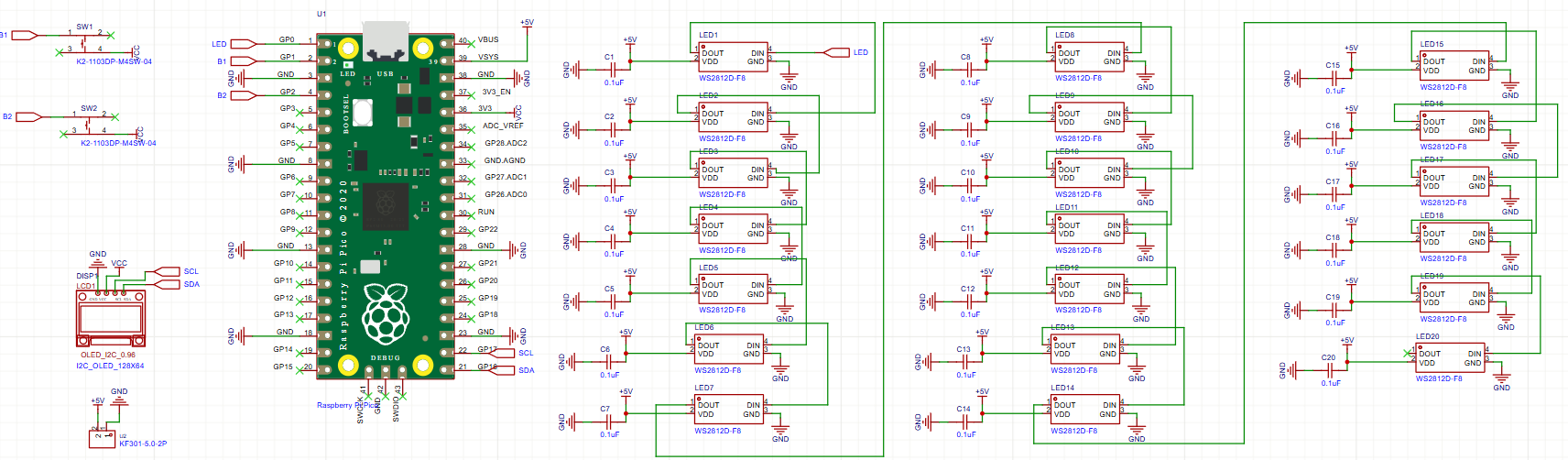
The schematic diagram was created in EasyEDA and can be downloaded here:
PCB Design
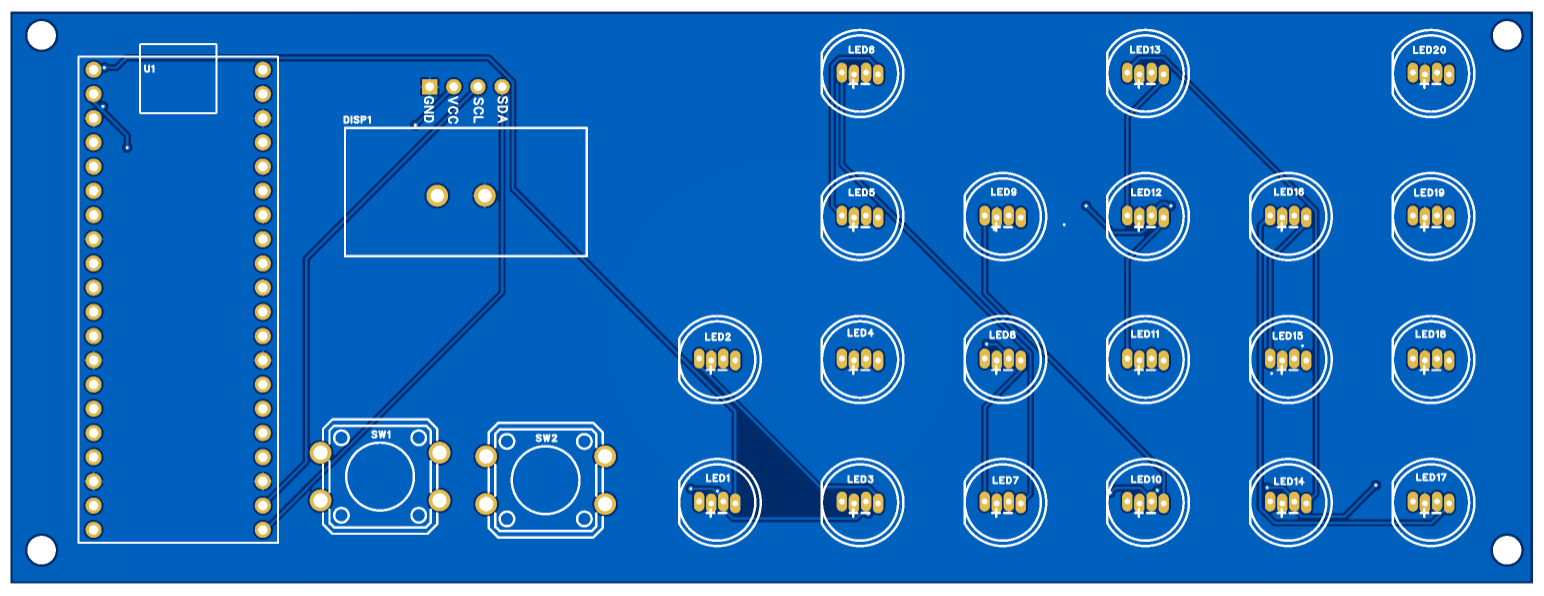
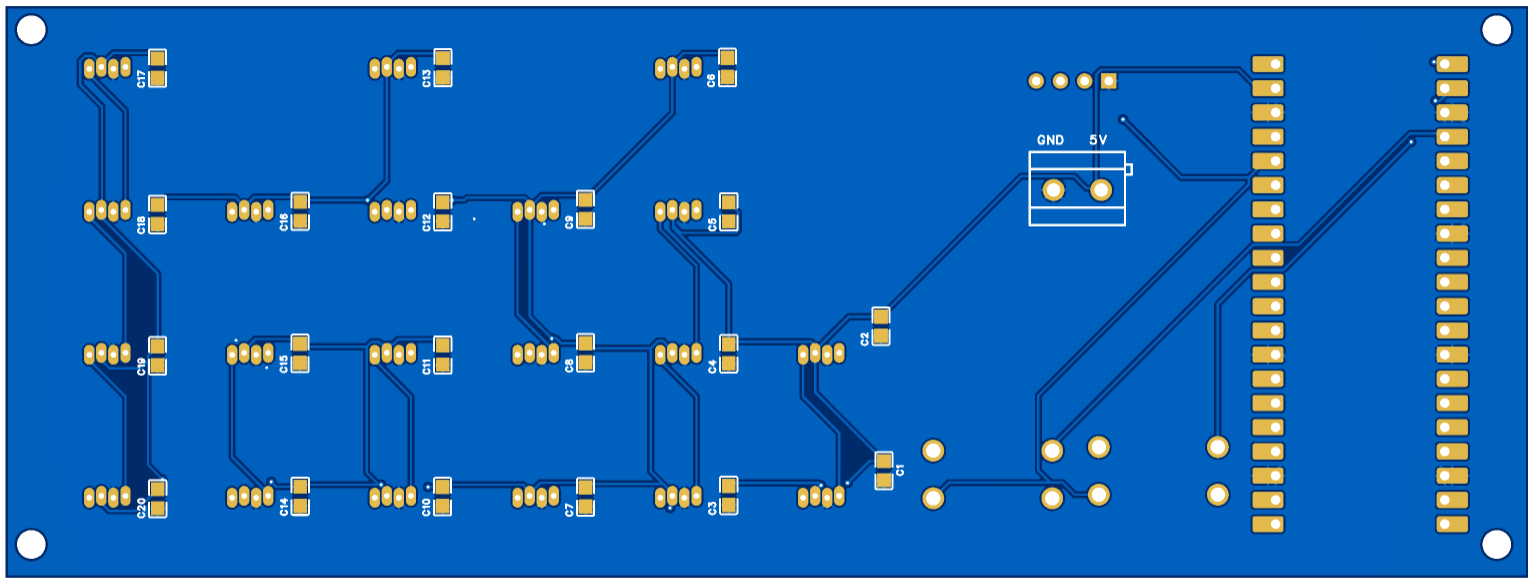
The PCB was designed using EasyEDA, a free and user-friendly web-based tool that supports circuit design, simulation, and PCB layout.
The version in YouTube video has no power input terminal to power Pico from external 5V which I have added in v2.
This design includes several key features:
- Two Push Buttons: These two push buttons will be used to display different data on the OLED display
- Mounting Holes: The PCB is equipped with four 3mm mounting holes, making it easy to secure within an enclosure.
Download Gerber file here: download.
PCB:
Order PCB (JLCPCB)
The PCB was ordered through JLCPCB. They offer great PCBs at a low cost and have promotions and coupons available throughout the year. You can sign up using here, or using the following link:
https://jlcpcb.com/?from=Nerd that will support me as a creator to keep making content that is accessible and open source at no charge to you.
Ordering the PCB is very simple:
Download the Gerber file here.
Click on Add Gerber file
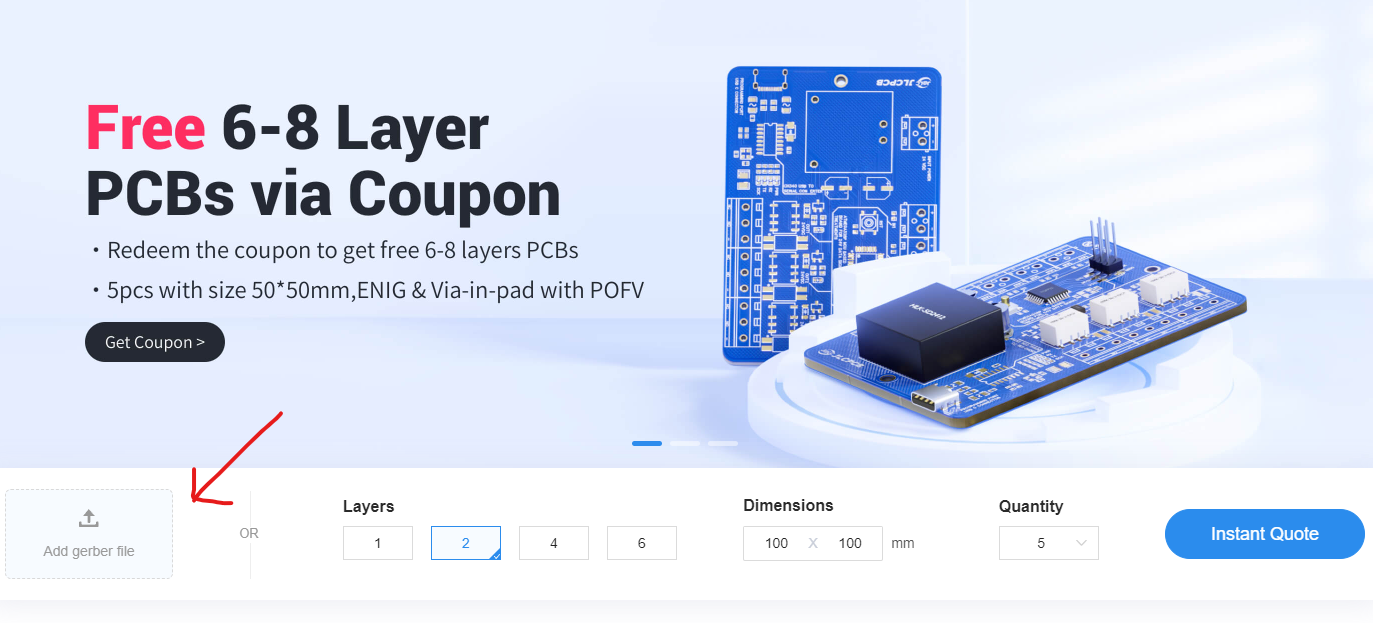
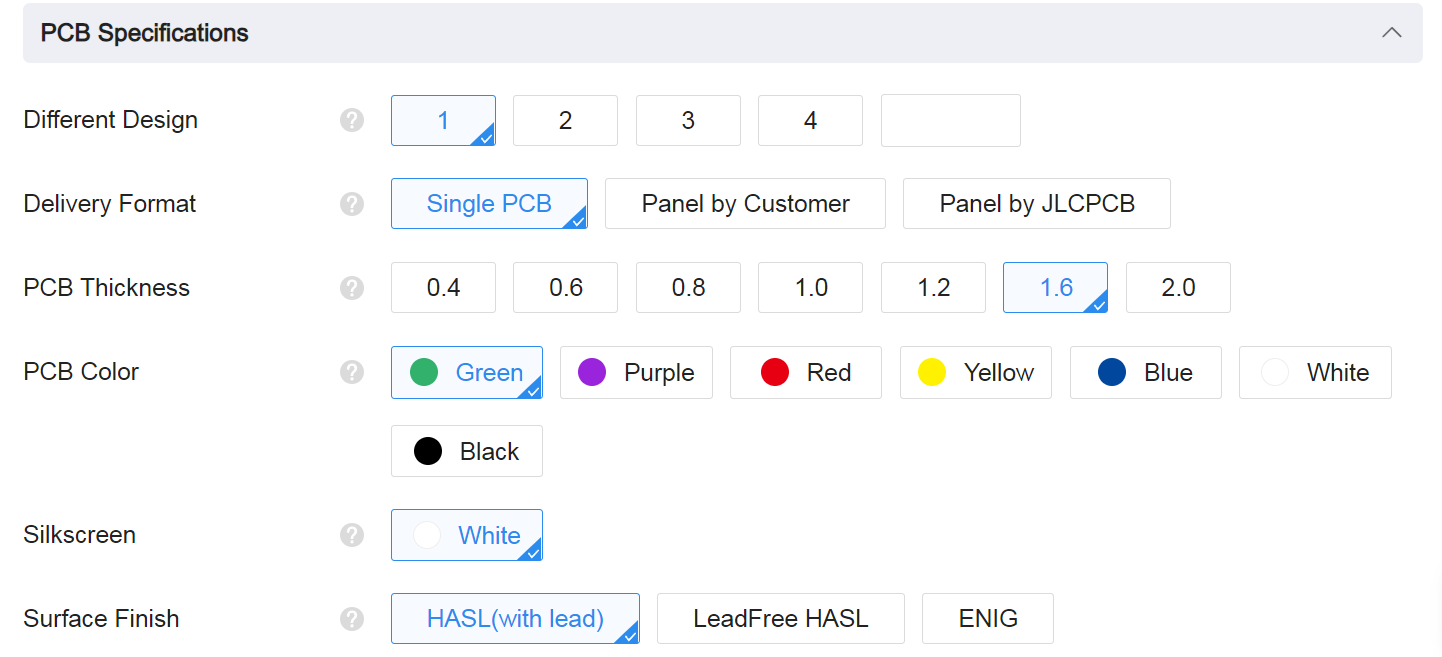
leave all the settings as default given. You might want change the PCB color which you can do here:
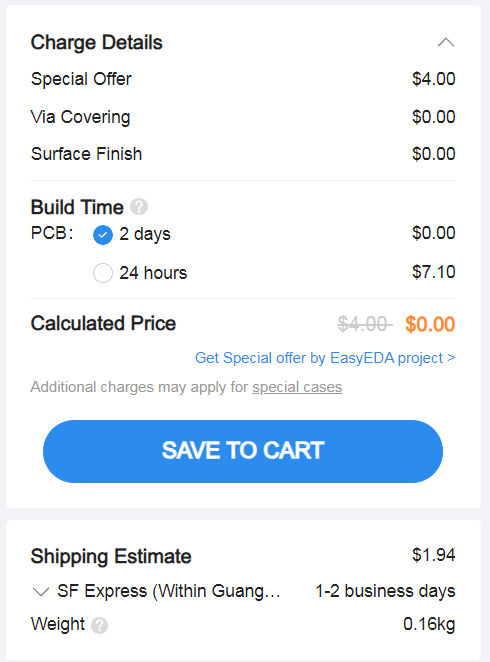
Enter you shipping details, save to cart
Then after a few days depending on your location you will receive your great quality PCB.
Enclosure Design:
The enclosure here is a simple draft that was quickly made and a better version will be done later. If you make your own enclosure please share it with me and I can upload it here.
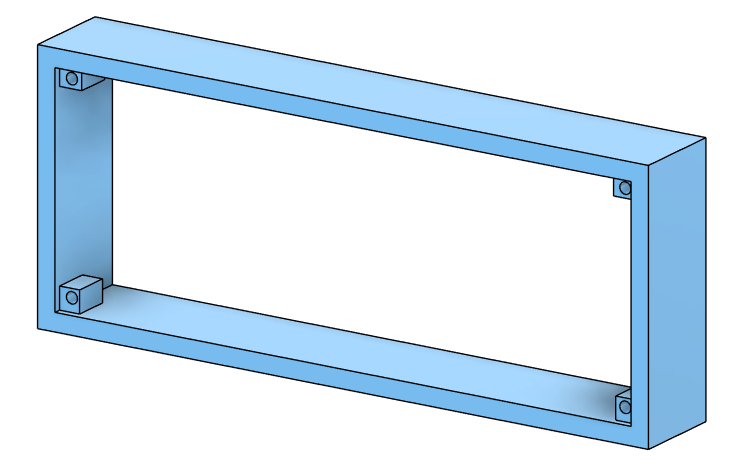
Download STL file here: download.
Code
You are going to need 4 files for this project
- config.json: In this file we will store all our private information, Wifi-Password, API Key and our city and country code.
- ssd1306.py: The library for controlling the ssd1306 OLED display
- urequests.py: Connecting the Pico W to the internet to use API to collect data
- main.py: The main program that will run on boot when the Pico is powered.
You can download the code using the following link, or copy it from this webpage below.
config.json
{

    "ssid": "Open_Internet",
    "ssid_password": "25802580",
    "query_interval_sec": 120,
    "weather_api_key": "ce54c4b03cfc0bd0fc037188def2d98e",
    "city": "Qingdao",
    "country_code": "CN",
    "date_time_api": "01bf0795f82e4e37bdd6fa163525131e",
    "time_zone": "Asia/Shanghai",
}
ssd1306.py
# MicroPython SSD1306 OLED driver, I2C and SPI interfaces

from micropython import const
import framebuf

# register definitions
SET_CONTRAST = const(0x81)
SET_ENTIRE_ON = const(0xA4)
SET_NORM_INV = const(0xA6)
SET_DISP = const(0xAE)
SET_MEM_ADDR = const(0x20)
SET_COL_ADDR = const(0x21)
SET_PAGE_ADDR = const(0x22)
SET_DISP_START_LINE = const(0x40)
SET_SEG_REMAP = const(0xA0)
SET_MUX_RATIO = const(0xA8)
SET_IREF_SELECT = const(0xAD)
SET_COM_OUT_DIR = const(0xC0)
SET_DISP_OFFSET = const(0xD3)
SET_COM_PIN_CFG = const(0xDA)
SET_DISP_CLK_DIV = const(0xD5)
SET_PRECHARGE = const(0xD9)
SET_VCOM_DESEL = const(0xDB)
SET_CHARGE_PUMP = const(0x8D)

# Subclassing FrameBuffer provides support for graphics primitives
# http://docs.micropython.org/en/latest/pyboard/library/framebuf.html
class SSD1306(framebuf.FrameBuffer):
    def __init__(self, width, height, external_vcc):
        self.width = width
        self.height = height
        self.external_vcc = external_vcc
        self.pages = self.height // 8
        self.buffer = bytearray(self.pages * self.width)
        super().__init__(self.buffer, self.width, self.height, framebuf.MONO_VLSB)
        self.init_display()

    def init_display(self):
        for cmd in (
            SET_DISP,  # display off
            # address setting
            SET_MEM_ADDR,
            0x00,  # horizontal
            # resolution and layout
            SET_DISP_START_LINE,  # start at line 0
            SET_SEG_REMAP | 0x01,  # column addr 127 mapped to SEG0
            SET_MUX_RATIO,
            self.height - 1,
            SET_COM_OUT_DIR | 0x08,  # scan from COM[N] to COM0
            SET_DISP_OFFSET,
            0x00,
            SET_COM_PIN_CFG,
            0x02 if self.width > 2 * self.height else 0x12,
            # timing and driving scheme
            SET_DISP_CLK_DIV,
            0x80,
            SET_PRECHARGE,
            0x22 if self.external_vcc else 0xF1,
            SET_VCOM_DESEL,
            0x30,  # 0.83*Vcc
            # display
            SET_CONTRAST,
            0xFF,  # maximum
            SET_ENTIRE_ON,  # output follows RAM contents
            SET_NORM_INV,  # not inverted
            SET_IREF_SELECT,
            0x30,  # enable internal IREF during display on
            # charge pump
            SET_CHARGE_PUMP,
            0x10 if self.external_vcc else 0x14,
            SET_DISP | 0x01,  # display on
        ):  # on
            self.write_cmd(cmd)
        self.fill(0)
        self.show()

    def poweroff(self):
        self.write_cmd(SET_DISP)

    def poweron(self):
        self.write_cmd(SET_DISP | 0x01)

    def contrast(self, contrast):
        self.write_cmd(SET_CONTRAST)
        self.write_cmd(contrast)

    def invert(self, invert):
        self.write_cmd(SET_NORM_INV | (invert & 1))

    def rotate(self, rotate):
        self.write_cmd(SET_COM_OUT_DIR | ((rotate & 1) << 3))
        self.write_cmd(SET_SEG_REMAP | (rotate & 1))

    def show(self):
        x0 = 0
        x1 = self.width - 1
        if self.width != 128:
            # narrow displays use centred columns
            col_offset = (128 - self.width) // 2
            x0 += col_offset
            x1 += col_offset
        self.write_cmd(SET_COL_ADDR)
        self.write_cmd(x0)
        self.write_cmd(x1)
        self.write_cmd(SET_PAGE_ADDR)
        self.write_cmd(0)
        self.write_cmd(self.pages - 1)
        self.write_data(self.buffer)


class SSD1306_I2C(SSD1306):
    def __init__(self, width, height, i2c, addr=0x3C, external_vcc=False):
        self.i2c = i2c
        self.addr = addr
        self.temp = bytearray(2)
        self.write_list = [b"\x40", None]  # Co=0, D/C#=1
        super().__init__(width, height, external_vcc)

    def write_cmd(self, cmd):
        self.temp[0] = 0x80  # Co=1, D/C#=0
        self.temp[1] = cmd
        self.i2c.writeto(self.addr, self.temp)

    def write_data(self, buf):
        self.write_list[1] = buf
        self.i2c.writevto(self.addr, self.write_list)


class SSD1306_SPI(SSD1306):
    def __init__(self, width, height, spi, dc, res, cs, external_vcc=False):
        self.rate = 10 * 1024 * 1024
        dc.init(dc.OUT, value=0)
        res.init(res.OUT, value=0)
        cs.init(cs.OUT, value=1)
        self.spi = spi
        self.dc = dc
        self.res = res
        self.cs = cs
        import time

        self.res(1)
        time.sleep_ms(1)
        self.res(0)
        time.sleep_ms(10)
        self.res(1)
        super().__init__(width, height, external_vcc)

    def write_cmd(self, cmd):
        self.spi.init(baudrate=self.rate, polarity=0, phase=0)
        self.cs(1)
        self.dc(0)
        self.cs(0)
        self.spi.write(bytearray([cmd]))
        self.cs(1)

    def write_data(self, buf):
        self.spi.init(baudrate=self.rate, polarity=0, phase=0)
        self.cs(1)
        self.dc(1)
        self.cs(0)
        self.spi.write(buf)
        self.cs(1)
urequests.py
import usocket

class Response:

    def __init__(self, f):
        self.raw = f
        self.encoding = "utf-8"
        self._cached = None

    def close(self):
        if self.raw:
            self.raw.close()
            self.raw = None
        self._cached = None

    @property
    def content(self):
        if self._cached is None:
            try:
                self._cached = self.raw.read()
            finally:
                self.raw.close()
                self.raw = None
        return self._cached

    @property
    def text(self):
        return str(self.content, self.encoding)

    def json(self):
        import ujson
        return ujson.loads(self.content)


def request(method, url, data=None, json=None, headers={}, stream=None):
    try:
        proto, dummy, host, path = url.split("/", 3)
    except ValueError:
        proto, dummy, host = url.split("/", 2)
        path = ""
    if proto == "http:":
        port = 80
    elif proto == "https:":
        import ussl
        port = 443
    else:
        raise ValueError("Unsupported protocol: " + proto)

    if ":" in host:
        host, port = host.split(":", 1)
        port = int(port)

    ai = usocket.getaddrinfo(host, port, 0, usocket.SOCK_STREAM)

    try:
        ai = ai[0]
    except:
        print("Count not resolve getaddrinfo for {} {}".format(host,port))

    s = usocket.socket(ai[0], ai[1], ai[2])
    try:
        s.connect(ai[-1])
        if proto == "https:":
            s = ussl.wrap_socket(s, server_hostname=host)
        s.write(b"%s /%s HTTP/1.0\r\n" % (method, path))
        if not "Host" in headers:
            s.write(b"Host: %s\r\n" % host)
        # Iterate over keys to avoid tuple alloc
        for k in headers:
            s.write(k)
            s.write(b": ")
            s.write(headers[k])
            s.write(b"\r\n")
        if json is not None:
            assert data is None
            import ujson
            data = ujson.dumps(json)
            s.write(b"Content-Type: application/json\r\n")
        if data:
            s.write(b"Content-Length: %d\r\n" % len(data))
        s.write(b"\r\n")
        if data:
            s.write(data)

        l = s.readline()
        #print(l)
        l = l.split(None, 2)
        status = int(l[1])
        reason = ""
        if len(l) > 2:
            reason = l[2].rstrip()
        while True:
            l = s.readline()
            if not l or l == b"\r\n":
                break
            #print(l)
            if l.startswith(b"Transfer-Encoding:"):
                if b"chunked" in l:
                    raise ValueError("Unsupported " + l)
            elif l.startswith(b"Location:") and not 200 <= status <= 299:
                raise NotImplementedError("Redirects not yet supported")
    except OSError:
        s.close()
        raise

    resp = Response(s)
    resp.status_code = status
    resp.reason = reason
    return resp


def head(url, **kw):
    return request("HEAD", url, **kw)

def get(url, **kw):
    return request("GET", url, **kw)

def post(url, **kw):
    return request("POST", url, **kw)

def put(url, **kw):
    return request("PUT", url, **kw)

def patch(url, **kw):
    return request("PATCH", url, **kw)

def delete(url, **kw):
    return request("DELETE", url, **kw)
main.py
import utime
from machine import Pin, I2C, RTC
import json
import urequests
import network
from ssd1306 import SSD1306_I2C
from neopixel import Neopixel


# ============================
# NeoPixel Setup (20 LEDs)
# ============================
NUM_LEDS = 20
PIN_NUM = 0
STATE_MACHINE = 0

np = Neopixel(NUM_LEDS, STATE_MACHINE, PIN_NUM, "GRB")
np.brightness(80)  # optional: 1-255


# Time colors (EDIT THESE ANYTIME)
# NOTE: Your tuple format is (R, G, B) — library handles GRB packing internally
COLOR_HOURS   = (255, 0, 0)     # Red
COLOR_MINUTES = (0, 0, 255)     # Blue
COLOR_SECONDS = (0, 180, 180)   # Cyan-ish


def all_off():
    np.clear()
    np.show()


# LED Groups: start index or custom list
groups = {
    "H_tens":  (0, 2),
    "H_ones":  (2, 4),
    "M_tens":  (6, 3),
    "M_ones":  (9, 4),
    "S_tens":  (13, 3),
    "S_ones":  (16, 4),
}

# LSB first + supports custom lists
def set_group_value(group, length, value, color):
    if isinstance(group, list):
        for i in range(length):
            bit = (value >> i) & 1
            np.set_pixel(group[i], color if bit else (0, 0, 0))
    else:
        start = group
        for i in range(length):
            bit = (value >> i) & 1
            np.set_pixel(start + i, color if bit else (0, 0, 0))


def update_leds_ws2812():
    Y, M, D, W, H, Min, S, SS = rtc.datetime()
    h1, h2 = divmod(H, 10)
    m1, m2 = divmod(Min, 10)
    s1, s2 = divmod(S, 10)

    set_group_value(*groups["H_tens"], h1, COLOR_HOURS)
    set_group_value(*groups["H_ones"], h2, COLOR_HOURS)

    set_group_value(*groups["M_tens"], m1, COLOR_MINUTES)
    set_group_value(*groups["M_ones"], m2, COLOR_MINUTES)

    set_group_value(*groups["S_tens"], s1, COLOR_SECONDS)
    set_group_value(*groups["S_ones"], s2, COLOR_SECONDS)

    np.show()


# ============================
# WiFi + API + RTC + OLED
# ============================
with open('config.json') as f:
    config = json.load(f)

if config['ssid'] == 'Enter_Wifi_SSID':
    raise ValueError("config.json not updated")

weather_api_key = config['weather_api_key']
city = config['city']
country_code = config['country_code']
date_time_api = config['date_time_api']
timezone = config['time_zone']

# WiFi Init
wlan = network.WLAN(network.STA_IF)
wlan.active(True)
print("Connecting to WiFi:", config['ssid'])
wlan.connect(config['ssid'], config['ssid_password'])
while not wlan.isconnected():
    utime.sleep(1)
print("Connected:", wlan.ifconfig())

rtc = RTC()

def sync_time_with_ip_geolocation_api(rtc):
    try:
        url = f'http://api.ipgeolocation.io/timezone?apiKey={date_time_api}&tz={timezone}'
        r = urequests.get(url)
        d = r.json()
        r.close()

        date, t = d["date_time"].split(" ")
        y, m, day = map(int, date.split("-"))
        h, mi, s = map(int, t.split(":"))
        wd = d.get("day_of_week", 0)

        rtc.datetime((y, m, day, wd, h, mi, s, 0))
        return True
    except:
        return False

def fetch_weather():
    try:
        url = f"http://api.openweathermap.org/data/2.5/weather?q={city},{country_code}&appid={weather_api_key}&units=metric"
        r = urequests.get(url)
        d = r.json()
        r.close()
        return {
            'location': f"{d['name']} - {d['sys']['country']}",
            'description': d['weather'][0]['main'],
            'temperature': d['main']['temp'],
            'pressure': d['main']['pressure'],
            'humidity': d['main']['humidity'],
            'wind_speed': d['wind']['speed'],
        }
    except:
        return None

# OLED Setup
i2c = I2C(0, scl=Pin(17), sda=Pin(16), freq=400000)
display = SSD1306_I2C(128, 64, i2c)

def show_status(msg, line=0):
    display.fill(0)
    display.text("NerdCave Clock", 0, 0)
    display.text(msg, 0, 20 + line*12)
    display.show()

# Buttons
btn_next = Pin(11, Pin.IN, Pin.PULL_DOWN)
btn_prev = Pin(12, Pin.IN, Pin.PULL_DOWN)
current_page = 0
total_pages = 3

def handle_buttons():
    global current_page
    if btn_next.value():
        current_page = (current_page + 1) % total_pages
        utime.sleep_ms(250)
    if btn_prev.value():
        current_page = (current_page - 1) % total_pages
        utime.sleep_ms(250)

# OLED Pages
def display_time_date():
    Y, M, D, W, H, Min, S, SS = rtc.datetime()
    display.fill(0)
    display.text("NerdCave Clock", 0, 0)
    display.text(f"{D:02}-{M:02}-{Y}", 0, 20)
    display.text(f"{H:02}:{Min:02}:{S:02}", 0, 35)
    display.show()

def display_weather_basic(w):
    display.fill(0)
    display.text("Weather:", 0, 0)
    display.text(w['location'], 0, 12)
    display.text(f"T:{w['temperature']}C", 0, 24)
    display.text(w['description'], 0, 36)
    display.text(f"H:{w['humidity']}%", 0, 48)
    display.show()

def display_weather_extended(w):
    display.fill(0)
    display.text("Weather Ext:", 0, 0)
    display.text(f"P:{w['pressure']}", 0, 16)
    display.text(f"W:{w['wind_speed']}m/s", 0, 32)
    display.text(f"T:{w['temperature']}C", 0, 48)
    display.show()

# Startup
show_status("WiFi OK")
w = fetch_weather()
show_status("Weather OK" if w else "Weather ERR")

show_status("Time OK" if sync_time_with_ip_geolocation_api(rtc) else "Time ERR", 1)

# Optional: clear LEDs on boot
all_off()

# Main Loop
last_weather_update = utime.time()
last_time_sync = utime.time()
last_tick = utime.ticks_ms()

while True:
    if utime.ticks_diff(utime.ticks_ms(), last_tick) >= 1000:
        last_tick = utime.ticks_ms()

        handle_buttons()
        update_leds_ws2812()

        if current_page == 0:
            display_time_date()
        elif current_page == 1 and w:
            display_weather_basic(w)
        elif current_page == 2 and w:
            display_weather_extended(w)

        if utime.time() - last_weather_update > 600:
            w = fetch_weather()
            last_weather_update = utime.time()

        if utime.time() - last_time_sync > 600:
            sync_time_with_ip_geolocation_api(rtc)
            last_time_sync = utime.time()
Conclusion
Hope you enjoy this project.