Waveshare RP2350B-Plus-W
Introduction
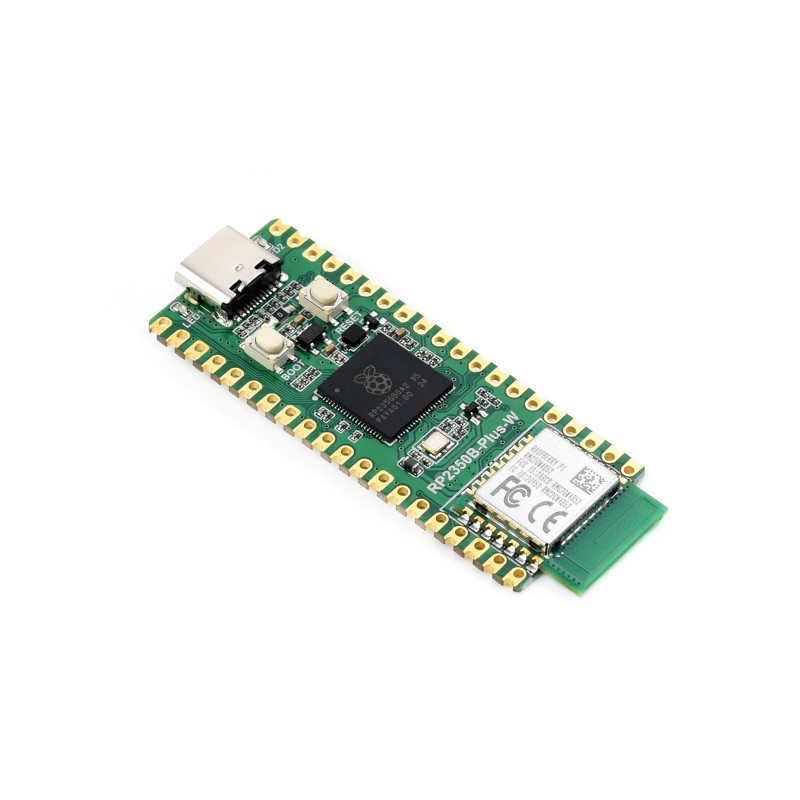
The Waveshare RP2350B Plus W is one of the first boards based on the new Raspberry Pi RP2350B chip. It’s a compact, powerful board featuring dual-core support for both ARM Cortex-M33 and Hazard3 RISC-V, onboard Wi-Fi 4 + Bluetooth 5.2 via Raspberry Pi’s Radio Module 2, and 16 MB flash — a massive step up from the Pico W’s 2 MB.
It’s fully compatible with most Pico add-ons and accessories, making it an exciting option for classrooms, IoT projects, and embedded makers.
Key highlights:
- RP2350B dual-core (ARM M33 / RISC-V)
- 16 MB QSPI Flash
- Built-in Wi-Fi 4 + Bluetooth 5.2 (RM2 module)
- USB-C interface
- 41 GPIO pins with PIO, ADC, PWM, and UART/I²C/SPI
- Compatible with Pico pinout
Getting Started with MicroPython
Before running the examples, ensure your firmware supports both network and bluetooth modules.
Steps:
- Download the latest RP2350B/Pico 2 MicroPython firmware from Waveshare’s wiki: https://files.waveshare.com/wiki/RP2350B-Plus-W/RP2350B-Plus-W.zip
- Hold BOOT and press RESET to enter UF2 mode.
- Copy the
.uf2file to the board. - Open Thonny, select MicroPython (Raspberry Pi Pico), and connect.
Example 1 – Wi-Fi Web Server (Toggle LED)
This example creates a small web server that hosts a button to toggle an LED and displays its current state.
import network
import socket
import time
from machine import Pin

LED_PIN = 23  # Change if your LED is on another GPIO
led = Pin(LED_PIN, Pin.OUT)

ssid = 'Open_Internet'
password = '25802580'

# --- Wi-Fi connect ---
wlan = network.WLAN(network.STA_IF)
wlan.active(True)
wlan.connect(ssid, password)

max_wait = 10
while max_wait > 0 and wlan.status() < 3:
    print('connecting...')
    time.sleep(1)
    max_wait -= 1

if wlan.status() != 3:
    raise RuntimeError('Wi-Fi connection failed')
status = wlan.ifconfig()
ip = status[0]
print('connected, ip =', ip)

# --- HTML page ---
def web_page():
    state = "ON" if led.value() else "OFF"
    return f"""<!DOCTYPE html>
<html>
<head>
  <meta name="viewport" content="width=device-width, initial-scale=1">
  <title>RP2350B Plus W LED</title>
  <style>
    body {{ font-family: system-ui, Arial; text-align:center; margin-top:48px; }}
    h1 {{ margin-bottom: 8px; }}
    p  {{ font-size: 20px; }}
    button {{
      padding: 16px 28px; font-size: 22px; border:0; border-radius:10px;
      cursor:pointer; box-shadow:0 6px 16px rgba(0,0,0,.15);
    }}
  </style>
</head>
<body>
  <h1>Waveshare RP2350B Plus W</h1>
  <p>LED is currently: <strong>{{state}}</strong></p>
  <form action="/toggle" method="get">
    <button type="submit">Toggle LED</button>
  </form>
</body>
</html>"""

# --- HTTP server ---
addr = socket.getaddrinfo(ip, 80)[0][-1]
s = socket.socket()
s.setsockopt(socket.SOL_SOCKET, socket.SO_REUSEADDR, 1)
s.bind(addr)
s.listen(1)
print('listening on', addr)
print(f'Open http://{ip} in your browser')

while True:
    try:
        cl, remote = s.accept()
        req = cl.recv(1024).decode()
        if 'GET /toggle' in req:
            led.value(0 if led.value() else 1)
        page = web_page()
        cl.send('HTTP/1.0 200 OK\r\nContent-Type: text/html\r\n\r\n')
        cl.send(page)
        cl.close()
    except OSError:
        try:
            cl.close()
        except:
            pass
Example 2 – Bluetooth UART (Control LED from Phone)
This example sets up a BLE UART service. You can connect using the nRF Connect app and send LED_ON or LED_OFF commands to toggle the LED.
import bluetooth
from machine import Pin
from micropython import const
import utime

LED = Pin(14, Pin.OUT)

_UART_UUID = bluetooth.UUID("6E400001-B5A3-F393-E0A9-E50E24DCCA9E")
_UART_TX   = (bluetooth.UUID("6E400003-B5A3-F393-E0A9-E50E24DCCA9E"), const(0x0010))
_UART_RX   = (bluetooth.UUID("6E400002-B5A3-F393-E0A9-E50E24DCCA9E"), const(0x0008))
_UART_SERVICE = (_UART_UUID, (_UART_TX, _UART_RX))

class BLEUART:
    def __init__(self, ble, name="RP2350B-LED"):
        self._ble = ble
        self._ble.active(True)
        self._ble.irq(self._irq)
        ((self._tx, self._rx),) = self._ble.gatts_register_services((_UART_SERVICE,))
        self._connections = set()

        adv = bytearray(b'\x02\x01\x06')
        n = name.encode()
        adv += bytes((len(n)+1, 0x09)) + n
        adv += bytes((3, 0x03, 0x0E, 0x18))
        self._ble.gap_advertise(500000, adv_data=adv)

    def _irq(self, event, data):
        if event == 1:
            conn_handle, _, _ = data
            self._connections.add(conn_handle)
        elif event == 2:
            conn_handle, _, _ = data
            self._connections.remove(conn_handle)
            self._ble.gap_advertise(500000)
        elif event == 3:
            conn_handle, value_handle = data
            msg = self._ble.gatts_read(value_handle).decode().strip()
            print("Received:", msg)
            self._handle_command(msg)

    def _handle_command(self, msg):
        if msg == "LED_ON":
            LED.value(1)
            print("LED is ON")
        elif msg == "LED_OFF":
            LED.value(0)
            print("LED is OFF")

ble = bluetooth.BLE()
uart = BLEUART(ble)

while True:
    utime.sleep(1)
Verdict
✅ Pros
- Excellent price-to-performance
- 16 MB flash & dual-core flexibility
- Built-in Wi-Fi + BLE 5.2
- USB-C and good documentation
⚠️ Cons
- Needs the correct MicroPython build to access wireless
- Smaller community support (for now)
Resources
Disclosure
Sample provided by Waveshare. All opinions are my own.