Tutorial 4 - Matrix Keypad
Introduction
A keypad is a rectangular array of buttons. In this tutorial, you will connect a matrix keypad to the Raspberry Pi 5 and read the character input from each key press.
Components Needed
| Component | Quantity |
|---|---|
| Raspberry Pi 5 | 1 |
| Breadboard | 1 |
| Wires | Several |
| Matrix Keypad | 1 |
| 1K Ohm Resistor | 8 |
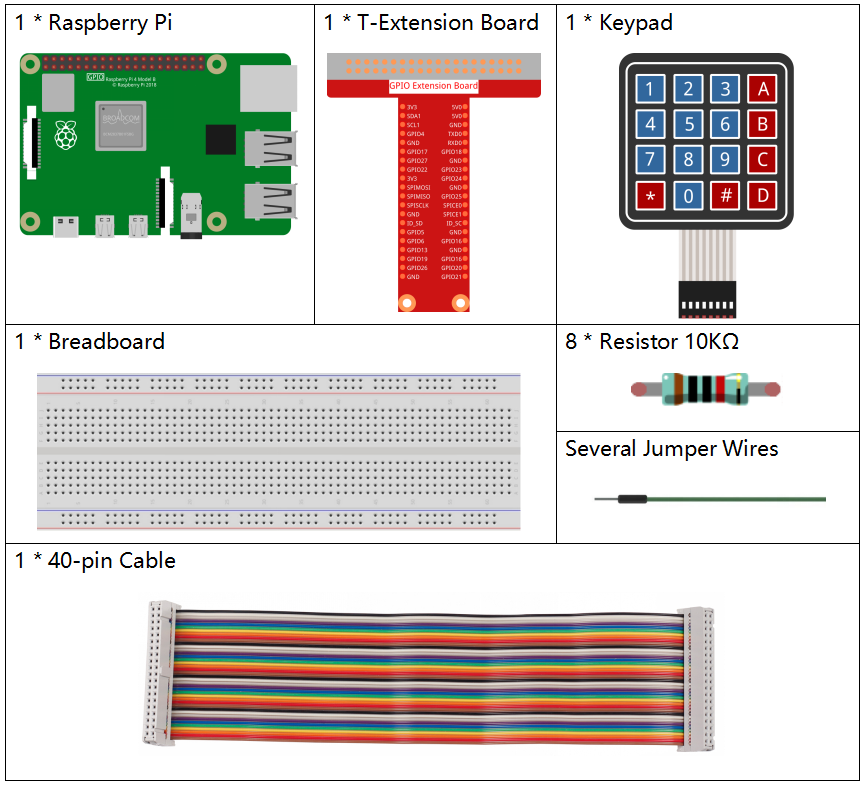
Image credit: SunFounder
Fritzing Diagram
Connect the keypad to your Raspberry Pi as shown in the following diagram.
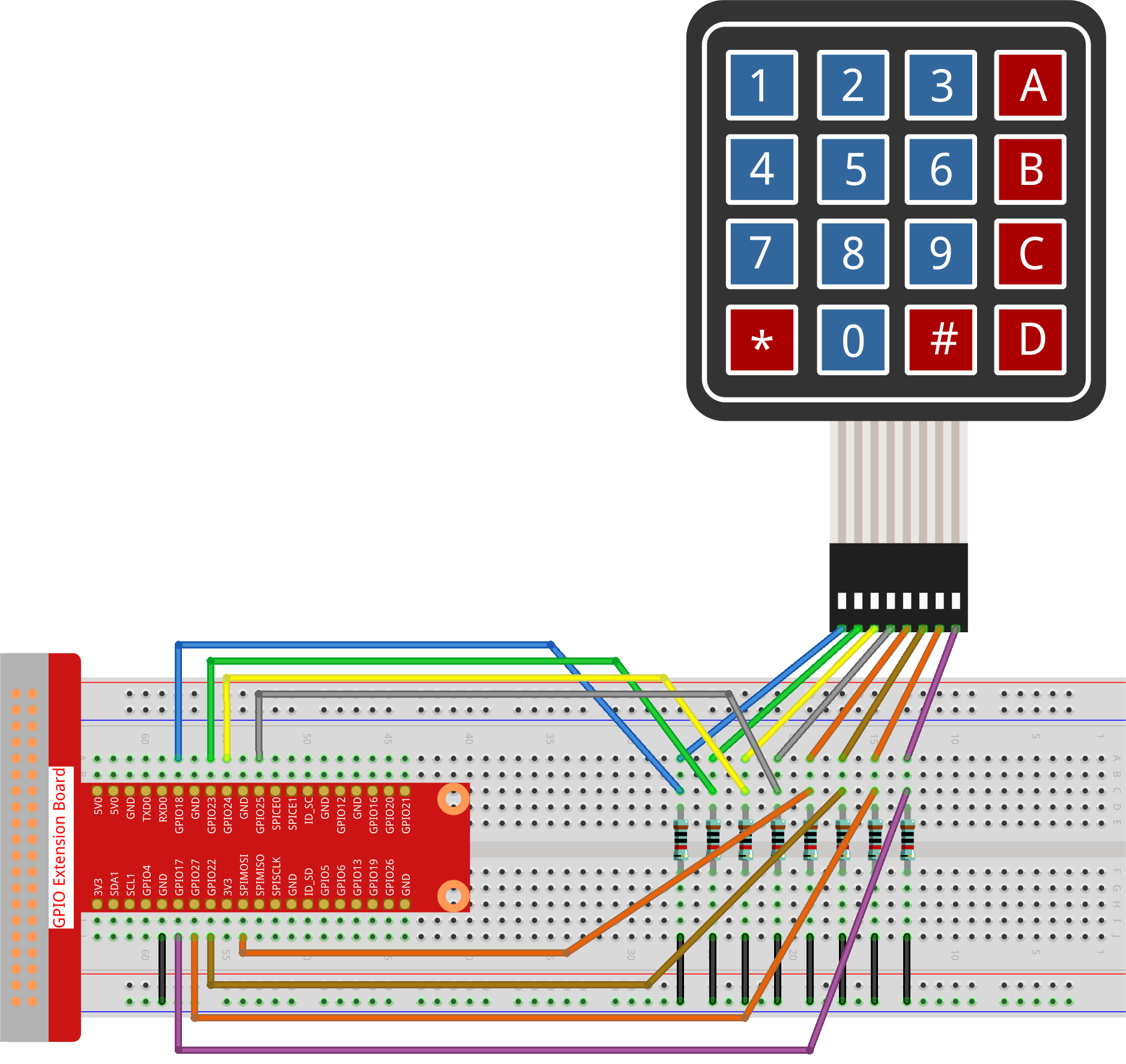
Image credit: SunFounder
Code
from gpiozero import DigitalOutputDevice, Button
from time import sleep

# Configure rows, columns, and keypad layout
rows_pins = [18, 23, 24, 25]
cols_pins = [10, 22, 27, 17]
keys = ["1", "2", "3", "A",
        "4", "5", "6", "B",
        "7", "8", "9", "C",
        "*", "0", "#", "D"]

# Initialize row pins as DigitalOutputDevice
rows = [DigitalOutputDevice(pin) for pin in rows_pins]
# Initialize column pins as Buttons
cols = [Button(pin, pull_up=False) for pin in cols_pins]

def read_keypad():
    """
    Read the currently pressed keys on the keypad.
    :return: A list of pressed keys.
    """
    pressed_keys = []
    for i, row in enumerate(rows):
        row.on()
        for j, col in enumerate(cols):
            if col.is_pressed:
                index = i * len(cols) + j
                pressed_keys.append(keys[index])
        row.off()
    return pressed_keys

last_key_pressed = []

print("Press keys on the keypad. Press Ctrl+C to exit.")
while True:
    pressed_keys = read_keypad()
    if pressed_keys and pressed_keys != last_key_pressed:
        print(pressed_keys)
        last_key_pressed = pressed_keys
    sleep(0.1)
Code Overview
The row pins are configured as outputs and the column pins are configured as inputs. The read_keypad() function activates each row one at a time and checks which columns respond, making it possible to identify the pressed key.
Code Explanation
rows_pins = [18, 23, 24, 25]
cols_pins = [10, 22, 27, 17]
These lists define the GPIO pins connected to the rows and columns of the keypad.
rows = [DigitalOutputDevice(pin) for pin in rows_pins]
cols = [Button(pin, pull_up=False) for pin in cols_pins]
Rows are set as outputs and columns are set as inputs.
def read_keypad():
This function scans the keypad and returns a list of pressed keys.
index = i * len(cols) + j
pressed_keys.append(keys[index])
This calculates the correct character based on the current row and column.
sleep(0.1)
The small delay lowers CPU usage while continuously scanning the keypad.
Code Password Example
from gpiozero import DigitalOutputDevice, Button
from time import sleep

rows_pins = [18, 23, 24, 25]
cols_pins = [10, 22, 27, 17]
keys = ["1", "2", "3", "A",
        "4", "5", "6", "B",
        "7", "8", "9", "C",
        "*", "0", "#", "D"]

rows = [DigitalOutputDevice(pin) for pin in rows_pins]
cols = [Button(pin, pull_up=False) for pin in cols_pins]

password = ["1", "2", "3", "4"]
entered_keys = []

def read_keypad():
    pressed_keys = []
    for i, row in enumerate(rows):
        row.on()
        for j, col in enumerate(cols):
            if col.is_pressed:
                index = i * len(cols) + j
                pressed_keys.append(keys[index])
        row.off()
    return pressed_keys

last_key_pressed = []

print("Press keys on the keypad. Press Ctrl+C to exit.")
while True:
    pressed_keys = read_keypad()
    if pressed_keys and pressed_keys != last_key_pressed:
        for key in pressed_keys:
            if key == "#":
                if entered_keys == password:
                    print("Access Granted!")
                else:
                    print("Access Denied! Try again.")
                entered_keys = []
            elif key == "*":
                entered_keys = []
            else:
                entered_keys.append(key)
        print(f"Entered keys: {entered_keys}")
        last_key_pressed = pressed_keys
    sleep(0.1)