Tutorial 2 - LED Control
YouTube Video
Introduction
Turning an LED on and off is often treated as the "Hello World" of hardware programming. It is a simple, foundational task that shows how to control a GPIO output and verify that your hardware is wired correctly.
By writing a program that blinks an LED, you learn how to configure a digital output pin and use delays to create a repeating pattern. That same pattern applies later to motors, relays, sensors, and more complex embedded projects.
Components Needed
| Component | Quantity |
|---|---|
| Raspberry Pi 5 | 1 |
| Breadboard | 1 |
| Wires | Several |
| LED | 1 |
| 300 - 1K Ohm Resistor | 1 |
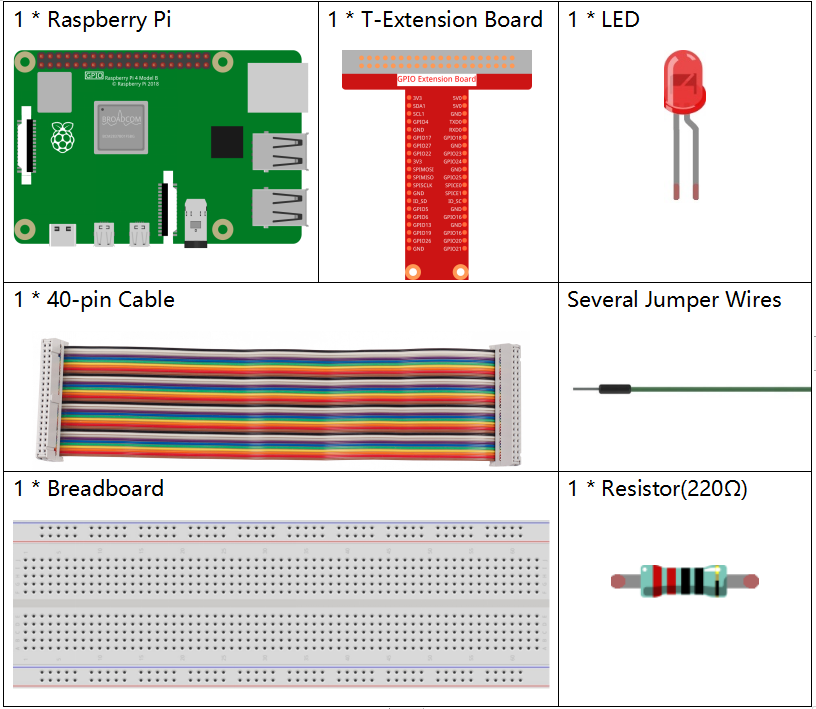
Image credit: SunFounder
Fritzing Diagram
Connect the LED to your Raspberry Pi as shown in the following diagram.
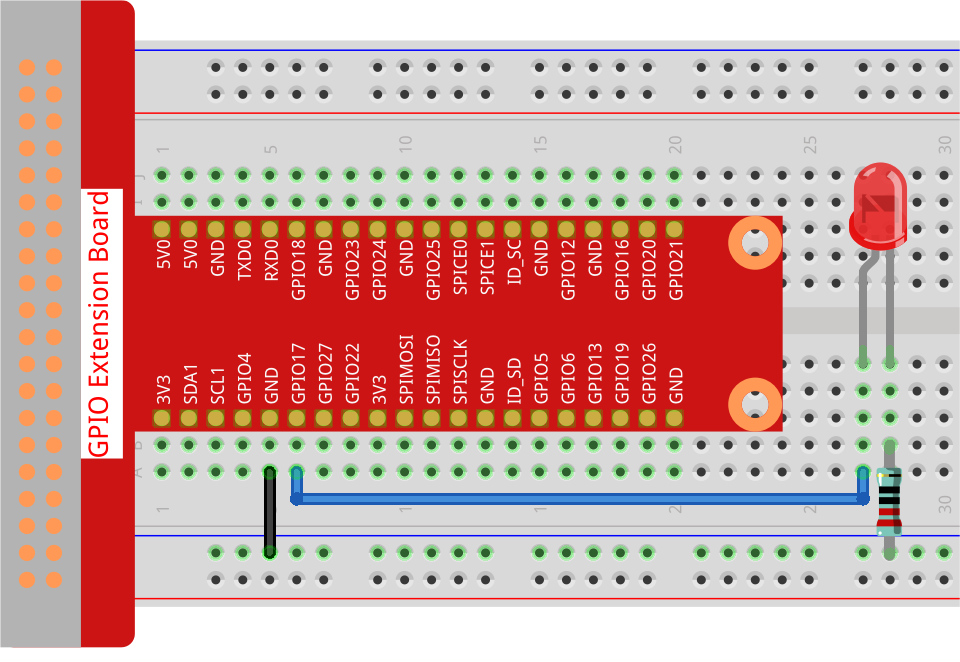
Image credit: SunFounder
Code
from gpiozero import LED
from time import sleep

# Initialize an LED connected to GPIO pin 17 using the GPIO Zero library.
led = LED(17)

while True:
    # Turn on the LED and print a message to the console.
    led.on()
    print('LED ON')

    # Wait for 0.5 seconds with the LED on.
    sleep(0.5)

    # Turn off the LED and print a message to the console.
    led.off()
    print('LED OFF')

    # Wait for 0.5 seconds with the LED off.
    sleep(0.5)
Code Explanation
Importing Libraries
from gpiozero import LED
from time import sleep
from gpiozero import LED imports the LED class from the gpiozero library so the Raspberry Pi can control an LED connected to a GPIO pin.
from time import sleep imports the sleep function so the program can pause between turning the LED on and off.
Initializing the LED
led = LED(17)
led = LED(17) creates an LED object connected to GPIO pin 17.
Infinite Loop
while True:
while True keeps the code running until you stop it manually.
Turning the LED On
led.on()
print('LED ON')
led.on() turns on the LED, and print('LED ON') shows the current state in the terminal.
Delay After Turning On
sleep(0.5)
sleep(0.5) keeps the LED on for half a second.
Turning the LED Off
led.off()
print('LED OFF')
led.off() turns the LED off, and print('LED OFF') confirms the state in the terminal.
Delay After Turning Off
sleep(0.5)
The second sleep(0.5) keeps the LED off for half a second before the loop repeats.
Summary
This code creates a simple blinking LED effect by turning the LED on for 0.5 seconds, turning it off for 0.5 seconds, and repeating the cycle indefinitely.