Tutorial 8 - Buzzers
Buzzers are simple sound modules commonly used in DIY projects.
There are two types of buzzers:
-
Active Buzzer
- Has a built-in oscillator.
- Produces a fixed tone when powered (simply ON or OFF).
-
Passive Buzzer
- Does not have a built-in oscillator.
- Needs a changing signal (PWM) to generate sound.
- Can play different frequencies -> tones, melodies, or music.
In this tutorial, we'll connect both buzzers to the ESP32-S3 Pico and use MicroPython to demonstrate how they work.
Components Needed
| Component | Quantity |
|---|---|
| ESP32-S3 Pico | 1 |
| USB-C Cable | 1 |
| Breadboard | 1 |
| Jumper Wires | Several |
| Active Buzzer | 1 |
| Passive Buzzer | 1 |
Fritzing Diagram
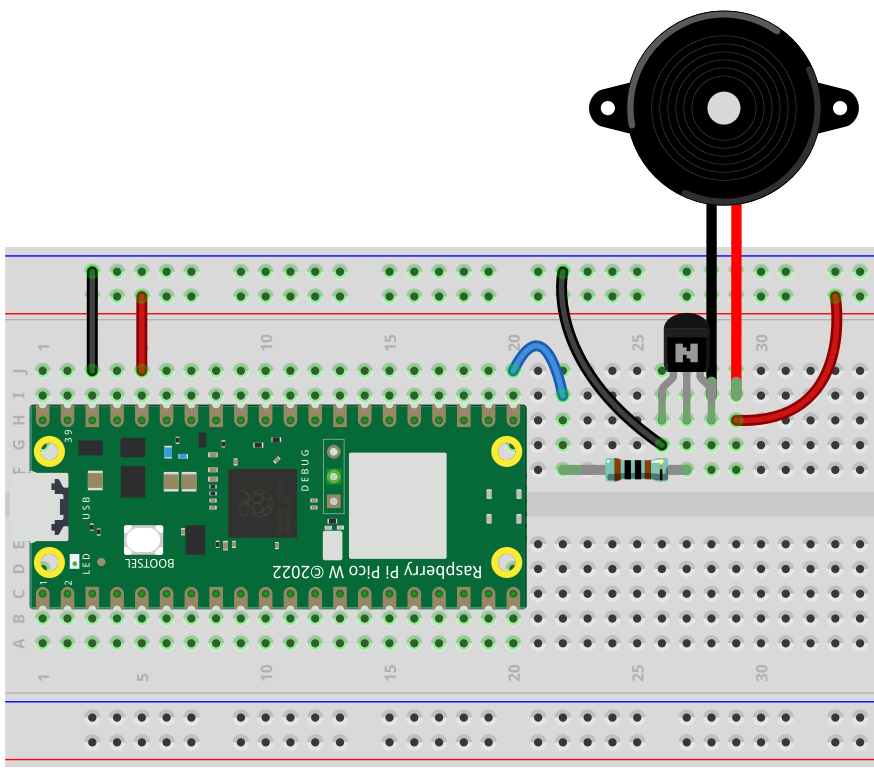
Connections (example pins):
- Active Buzzer -> GPIO40
- Passive Buzzer -> GPIO41
- VCC -> 3.3V
- GND -> GND
Demo 1 - Active Buzzer (ON/OFF)
from machine import Pin
import utime

buzzer_active = Pin(40, Pin.OUT)

while True:
    buzzer_active.value(1)  # Turn ON
    utime.sleep(1)
    buzzer_active.value(0)  # Turn OFF
    utime.sleep(1)
Code Explanation
Pin(40, Pin.OUT)-> GPIO40 controls the buzzer.value(1)-> Sends HIGH (buzzer turns ON, fixed tone).value(0)-> Sends LOW (buzzer OFF).- Simple ON/OFF control with no pitch changes.
Demo 2 - Passive Buzzer (Tones)
from machine import Pin, PWM
import utime

buzzer_passive = PWM(Pin(41))
buzzer_passive.duty(512)  # 50% duty cycle

notes = [262, 294, 330, 349, 392, 440, 494, 523]  # Do Re Mi Fa So La Ti Do

while True:
    for note in notes:
        buzzer_passive.freq(note)
        utime.sleep(0.3)
Code Explanation
PWM(Pin(41))-> Sets GPIO41 as a PWM output.duty(512)-> 50% duty cycle (required to make sound).freq(note)-> Sets the pitch (frequency in Hz).notes-> A list of frequencies corresponding to music notes.- Loop plays a simple scale.
Demo 3 - Passive Buzzer Beep Pattern
from machine import Pin, PWM
import utime

buzzer = PWM(Pin(41))
buzzer.duty(512)

while True:
    buzzer.freq(1000)   # Beep at 1kHz
    utime.sleep(0.2)
    buzzer.duty(0)      # Silence
    utime.sleep(0.2)
Code Explanation
freq(1000)-> Sets tone to 1 kHz.duty(0)-> Turns sound OFF without disabling PWM.- Alternates between sound and silence -> beep effect.
Demo 4 - Playing a Song (Eine Kleine Nachtmusik)
Now that we know how to play tones, let's play a longer melody.
Here we'll play Mozart - Eine Kleine Nachtmusik (simplified transcription).
from machine import Pin, PWM
import utime

buzzer = PWM(Pin(41))
buzzer.duty(512)

# Define notes (Hz)
C4 = 262
D4 = 294
E4 = 330
F4 = 349
G4 = 392
A4 = 440
B4 = 494
C5 = 523
D5 = 587
E5 = 659
F5 = 698
G5 = 784
A5 = 880

# Melody (simplified full theme)
melody = [
    G4, G4, G4, D5, G4, G4, G4, D5,
    G4, G4, G4, D5, G4, F5, E5, D5,
    C5, C5, C5, G5, F5, E5, D5, C5,
    B4, B4, B4, G5, F5, E5, D5, C5,
    A4, A4, A4, F5, E5, D5, C5, B4,
    G4, G4, G4, D5, G4, F5, E5, D5
]

durations = [
    0.3, 0.3, 0.3, 0.6, 0.3, 0.3, 0.3, 0.6,
    0.3, 0.3, 0.3, 0.6, 0.3, 0.3, 0.3, 0.6,
    0.3, 0.3, 0.3, 0.6, 0.3, 0.3, 0.3, 0.6,
    0.3, 0.3, 0.3, 0.6, 0.3, 0.3, 0.3, 0.6,
    0.3, 0.3, 0.3, 0.6, 0.3, 0.3, 0.3, 0.6,
    0.3, 0.3, 0.3, 0.6, 0.3, 0.3, 0.3, 0.6
]

for note, duration in zip(melody, durations):
    if note == 0:  # rest
        buzzer.duty(0)
    else:
        buzzer.freq(note)
        buzzer.duty(512)
    utime.sleep(duration)
    buzzer.duty(0)   # short silence between notes
    utime.sleep(0.05)
Code Explanation
- Notes are defined as their frequencies (Hz).
melodyis a sequence of notes in the main theme.durationsmatches each note with its timing.- The loop plays each note and adds a short pause.
Summary
- Active Buzzer -> Simple ON/OFF sound, no pitch control.
- Passive Buzzer -> Requires PWM, can play tones and melodies.
- Example song (Eine Kleine Nachtmusik) shows how you can use the passive buzzer for real music.
OK Use active buzzers for alerts (simple beeps).
OK Use passive buzzers for music or custom sounds.