Custom 8×8 LED Matrix Panel
Project Overview
This project is a custom PCB-based 8×8 WS2812B LED matrix (64 LEDs total) driven by a Raspberry Pi Pico W. Here you will find a tool to create custom pixel art animations, a binary clock display, and an autonomous AI Tetris demo — all running in MicroPython.
Hardware at a glance
| Component | Details |
|---|---|
| Microcontroller | Raspberry Pi Pico W |
| LED type | WS2812B (NeoPixel), 64 total |
| Color order | GRB |
| PCB designed in | KiCAD |
| Enclosures | FDM printed |
PCB Design
The PCB was designed in KiCAD. Two 3-pin screw terminals (SparkFun ScrewTerminal_1x03_P3.5mm_Horizontal_Black) handle all connections between the Pico W and the panel — one terminal for power and data in, and a second for chaining additional panels via the data-out line.
The LEDs are wired in a snake (serpentine) pattern: left-to-right on even rows, right-to-left on odd rows. All generated code accounts for this automatically.
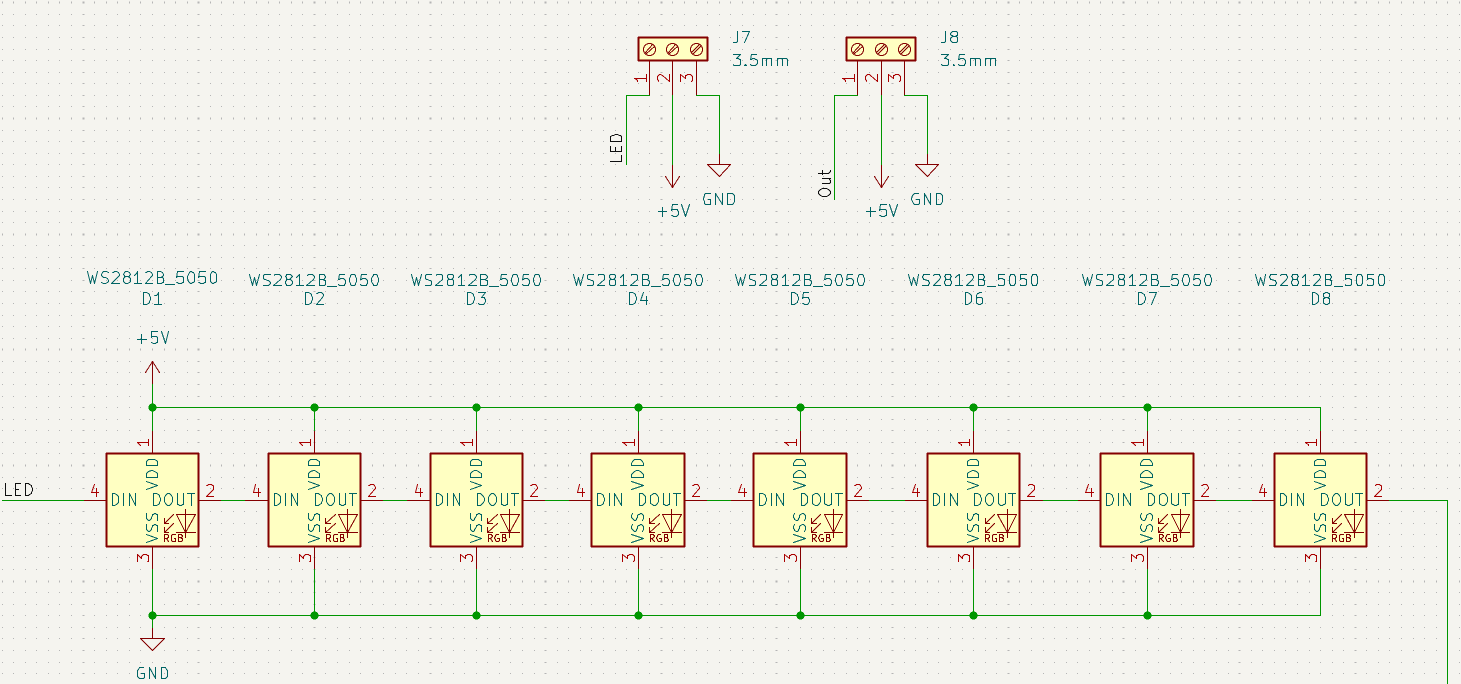
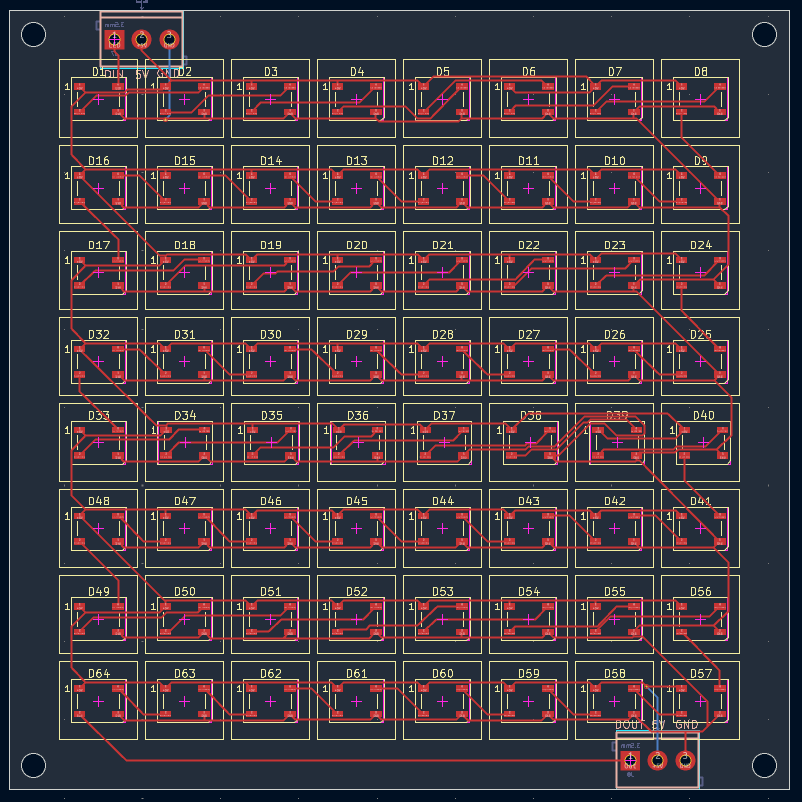
You can download the PCB Gerber files here: Download Gerbers (link coming soon)
Enclosures
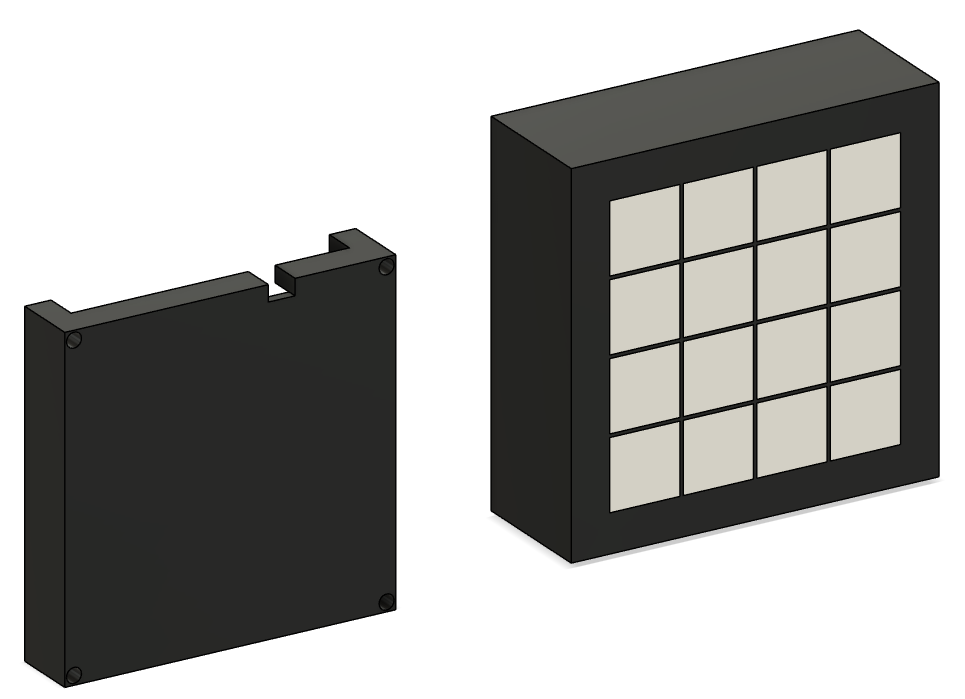
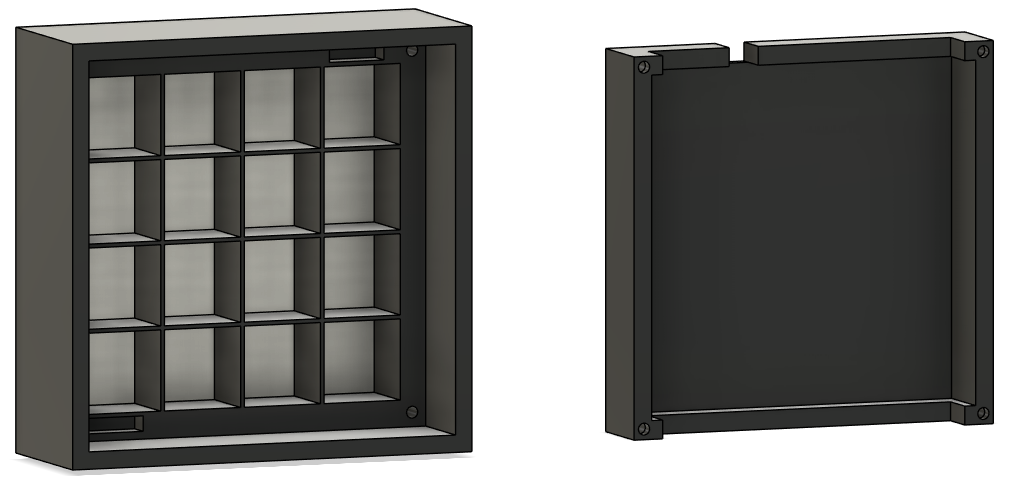
Two enclosures were designed and 3D printed for this panel.
Pixel Art Display (64-block diffuser)
White filament is printed at 0.6 mm layer height, which acts as a diffuser for each pixel — giving each one a soft, even glow that works great for pixel art and animations.
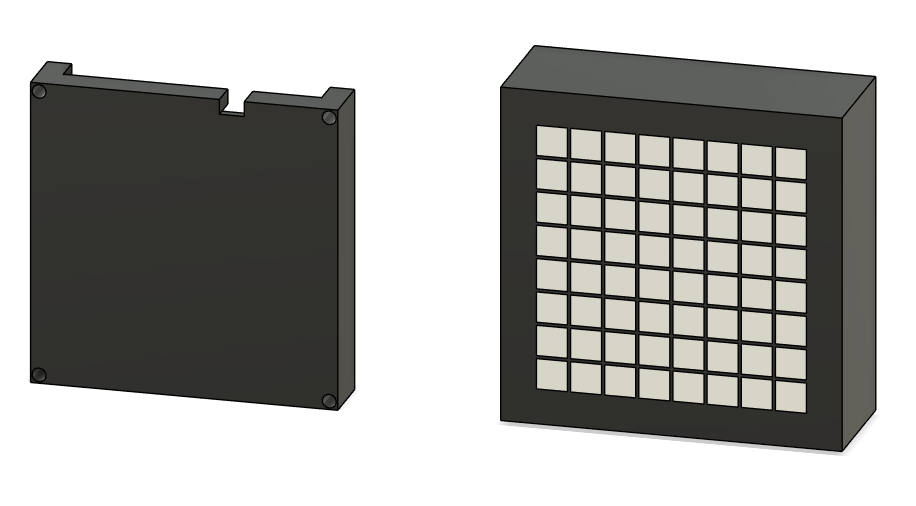
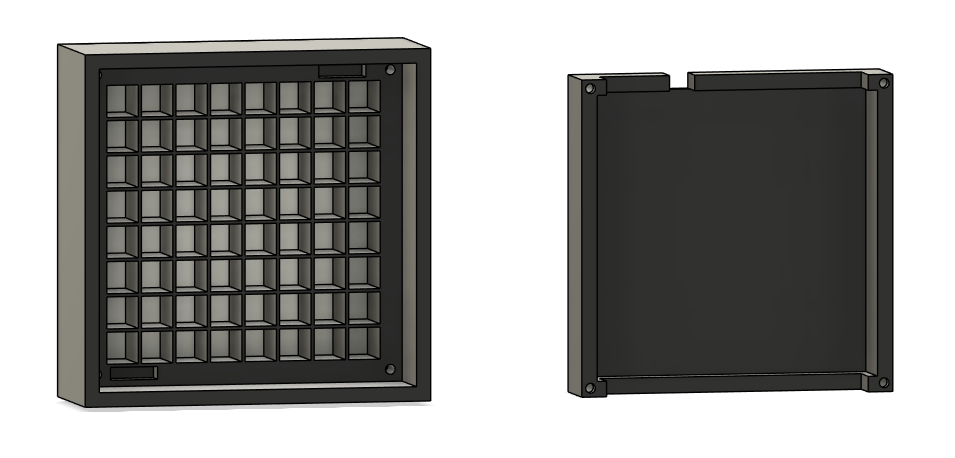
Binary Clock (HH:MM)
The second enclosure is purpose-built to display the time in binary HH:MM format. Each column of four LEDs represents one decimal digit, with bits read top-to-bottom (MSB first). The Pico W syncs time over NTP via Wi-Fi on boot.
LED Grid Animator
Use this tool to paint pixel art directly onto an 8×8 grid, build multi-frame animations, and export ready-to-run MicroPython code for your Pico W. The LED numbering shown on the grid matches the snake-wired PCB positions exactly.
from neopixel import Neopixel
import time

NUM_LEDS = 64
PIN      = 0
SM       = 0
strip = Neopixel(NUM_LEDS, SM, PIN, mode="GRB")
strip.brightness(100)

OFF = (0, 0, 0)

# Frame 1
FRAME_1 = {
}

def show_frame(frame_dict):
    strip.fill(OFF)
    for led_idx, color in frame_dict.items():
        strip.set_pixel(led_idx, color)
    strip.show()

FRAMES = [FRAME_1]

while True:
    for frame in FRAMES:
        show_frame(frame)
time.sleep_ms(500)How to use
- Pick a color from the palette or open the custom color picker
- Click or drag on the grid to paint LEDs — the numbers in each cell show the physical PCB LED position
- Add frames with the
+ framebutton and useduplicateto copy an existing frame as a starting point - Set your frame delay using the slider, then hit
▶ previewto see the animation play back in the browser - Choose an output mode —
animation loop,static, orfunction only— then copy the generated code into your Pico W project
The function only mode is handy when you want to integrate the frame into a larger script (like the binary clock) without an automatic loop.
Code Examples
Binary Clock
The binary clock connects to Wi-Fi on boot, syncs time via NTP, then displays HH:MM in binary on the 8×8 grid. Each of the four digit columns uses a distinct color so the display is easy to read at a glance.
Time is shown with the most significant bit at the top of each column — so the weights read 8, 4, 2, 1 from top to bottom. Add up the lit LEDs in each column to get that digit. The UTC offset is configurable via config.json.
Use the interactive demo below to practice reading the time before you wire anything up:
M tens 5: 8421 = 5 M ones 5: 8421 = 5
Each column = one digit. Lit numbers add up to that digit. Read top→bottom: 8, 4, 2, 1.
import time
import network
import ntptime
import json
from neopixel import Neopixel

# =========================
# CONFIG — reads from config.json
# =========================

with open('config.json') as f:
    config = json.load(f)

WIFI_SSID     = config['ssid']
WIFI_PASSWORD = config['ssid_password']
UTC_OFFSET    = config.get('utc_offset', 8)

NUM_LEDS   = 64
PIN        = 0
STATE_MACH = 0
BRIGHTNESS = 100

# =========================
# COLOURS (GRB mode)
# =========================
OFF_COLOR     = (200, 200, 200)
COLOR_HH_TENS = (30,  20,  120)
COLOR_HH_ONES = (120, 20,  60)
COLOR_MM_TENS = (80,  140, 0)
COLOR_MM_ONES = (20,  180, 40)

# =========================
# LED LOOKUP TABLE
# =========================
LED_MAP = {
    "MM_ones": [[7,8,9,10],   [23,24,25,26], [39,40,41,42], [55,56,57,58]],
    "MM_tens": [[5,6,12,11],  [21,22,27,28], [37,38,44,43], [53,54,59,60]],
    "HH_ones": [[3,4,13,14],  [19,20,29,30], [35,36,45,46], [51,52,61,62]],
    "HH_tens": [[1,2,15,16],  [17,18,31,32], [33,34,47,48], [49,50,63,64]],
}

DIGIT_ORDER  = ["HH_tens", "HH_ones", "MM_tens", "MM_ones"]
DIGIT_COLORS = {
    "HH_tens": COLOR_HH_TENS,
    "HH_ones": COLOR_HH_ONES,
    "MM_tens": COLOR_MM_TENS,
    "MM_ones": COLOR_MM_ONES,
}

# =========================
# WiFi
# =========================

def connect_wifi():
    wlan = network.WLAN(network.STA_IF)
    wlan.active(True)
    time.sleep(1)
    print("Connecting to WiFi:", WIFI_SSID)
    wlan.connect(WIFI_SSID, WIFI_PASSWORD)
    for _ in range(30):
        if wlan.isconnected():
            print("WiFi connected:", wlan.ifconfig())
            return True
        time.sleep(1)
    print("WiFi failed")
    return False

# =========================
# NTP — tries multiple servers
# =========================

NTP_SERVERS = [
    "ntp.aliyun.com",    # Alibaba — fast from Asia
    "cn.ntp.org.cn",     # China NTP pool
    "time.windows.com",
    "time.google.com",
    "pool.ntp.org",
]

def sync_ntp():
    for server in NTP_SERVERS:
        try:
            ntptime.host = server
            ntptime.settime()
            print("NTP synced via", server, "— UTC:", time.gmtime())
            return True
        except Exception as e:
            print("NTP failed:", server, e)
    print("All NTP servers failed")
    return False

def get_local_time():
    t = time.gmtime()
    hour   = (t[3] + UTC_OFFSET) % 24
    minute = t[4]
    return hour, minute

# =========================
# Display
# =========================

def show_time(strip, hour, minute):
    digits = {
        "HH_tens": hour // 10,
        "HH_ones": hour % 10,
        "MM_tens": minute // 10,
        "MM_ones": minute % 10,
    }

    strip.fill(OFF_COLOR)

    for name in DIGIT_ORDER:
        value  = digits[name]
        color  = DIGIT_COLORS[name]
        blocks = LED_MAP[name]

        for bit_pos in range(4):
            bit_value = (value >> (3 - bit_pos)) & 1
            if bit_value:
                for pcb_led in blocks[bit_pos]:
                    strip.set_pixel(pcb_led - 1, color)

    strip.show()

# =========================
# Main
# =========================

strip = Neopixel(NUM_LEDS, STATE_MACH, PIN, mode="GRB")
strip.brightness(BRIGHTNESS)
strip.fill((0, 0, 0))
strip.show()

connected = connect_wifi()
if connected:
    sync_ntp()

NTP_INTERVAL = 6 * 3600  # Re-sync every 6 hours
last_ntp     = time.time()
last_display = (-1, -1)

print("Binary clock running. Format: HH:MM")

while True:
    now = time.time()

    if connected and (now - last_ntp) > NTP_INTERVAL:
        if sync_ntp():
            last_ntp = now

    hour, minute = get_local_time()

    if (hour, minute) != last_display:
        show_time(strip, hour, minute)
        last_display = (hour, minute)
        print("Time: {:02d}:{:02d}".format(hour, minute))

    time.sleep(5)
config.json
Create this file on the Pico W alongside main.py:
{
  "ssid": "your_wifi_name",
  "ssid_password": "your_wifi_password",
  "utc_offset": 8
}
AI Tetris Demo
A fully autonomous Tetris demo that plays itself indefinitely. The AI evaluates every possible rotation and column placement using classic heuristics (aggregate height, completed lines, holes, bumpiness) and picks the best move each frame. Pieces fall one row per tick so the game is easy to follow on the physical display.
import time
import random
from neopixel import Neopixel

# =========================
# CONFIG
# =========================
NUM_LEDS   = 64
STATE_MACH = 0
PIN        = 0
BRIGHTNESS = 70
SIZE       = 8

strip = Neopixel(NUM_LEDS, STATE_MACH, PIN, mode="GRB")
strip.brightness(BRIGHTNESS)

OFF = (200, 200, 200)

# =========================
# SERPENTINE MAPPING
# =========================
def pixel_index(col, row):
    if row % 2 == 0:
        return row * SIZE + col
    else:
        return row * SIZE + (SIZE - 1 - col)

# =========================
# PIECES
# =========================
PIECES = [
    {"cells": ((0,0),(0,1),(0,2),(0,3)), "color": (0,180,220)},   # I
    {"cells": ((0,0),(0,1),(1,0),(1,1)), "color": (220,180,0)},   # O
    {"cells": ((0,1),(1,0),(1,1),(1,2)), "color": (140,0,220)},   # T
    {"cells": ((0,0),(1,0),(1,1),(1,2)), "color": (220,100,0)},   # J
    {"cells": ((0,2),(1,0),(1,1),(1,2)), "color": (0,60,220)},    # L
    {"cells": ((0,0),(0,1),(1,1),(1,2)), "color": (220,0,50)},    # S
    {"cells": ((0,1),(0,2),(1,0),(1,1)), "color": (0,200,60)},    # Z
]

FALL_SPEED = 0.20

# =========================
# ROTATE
# =========================
def rotate(cells):
    max_r = max(r for r, c in cells)
    rotated = tuple((c, max_r - r) for r, c in cells)
    min_r = min(r for r, c in rotated)
    min_c = min(c for r, c in rotated)
    return tuple((r - min_r, c - min_c) for r, c in rotated)

def get_rotations(cells):
    """Return all unique rotations of a piece."""
    seen = set()
    result = []
    cur = cells
    for _ in range(4):
        if cur not in seen:
            seen.add(cur)
            result.append(cur)
        cur = rotate(cur)
    return result

# =========================
# COLLISION
# =========================
def can_place(well, cells, dr, dc):
    for r, c in cells:
        nr = r + dr
        nc = c + dc
        if nr < 0 or nr >= SIZE:
            return False
        if nc < 0 or nc >= SIZE:
            return False
        if well[nr][nc] is not None:
            return False
    return True

# =========================
# SPAWN PIECE
# =========================
def spawn(well):
    piece = random.choice(PIECES)
    cells = piece["cells"]
    for _ in range(random.randint(0, 3)):
        cells = rotate(cells)
    max_c = max(c for r, c in cells)
    pc = (SIZE - max_c - 1) // 2
    pr = 0
    if not can_place(well, cells, pr, pc):
        return None, None, None, None
    return cells, pr, pc, piece["color"]

# =========================
# HEURISTIC SCORING
# =========================
def score_well(well):
    """
    Dellacherie heuristics — higher score is better.
    Weights: aggregate height, complete lines, holes, bumpiness.
    """
    col_heights = [0] * SIZE

    for c in range(SIZE):
        for r in range(SIZE):
            if well[r][c] is not None:
                col_heights[c] = SIZE - r
                break

    agg_height = sum(col_heights)

    complete_lines = sum(
        1 for r in range(SIZE)
        if all(well[r][c] is not None for c in range(SIZE))
    )

    holes = 0
    for c in range(SIZE):
        block_found = False
        for r in range(SIZE):
            if well[r][c] is not None:
                block_found = True
            elif block_found:
                holes += 1

    bumpiness = sum(
        abs(col_heights[c] - col_heights[c + 1])
        for c in range(SIZE - 1)
    )

    return (
        - 0.51 * agg_height
        + 0.76 * complete_lines
        - 0.36 * holes
        - 0.18 * bumpiness
    )

# =========================
# SIMULATE DROP
# =========================
def drop_cells(well, cells, pr, pc):
    """Drop cells straight down; return the final row."""
    dr = pr
    while can_place(well, cells, dr + 1, pc):
        dr += 1
    return dr

def simulate_lock(well, cells, dr, pc, color):
    """Return a copy of the well after locking the piece and clearing full lines."""
    new_well = [row[:] for row in well]
    for r, c in cells:
        nr = r + dr
        nc = c + pc
        if 0 <= nr < SIZE and 0 <= nc < SIZE:
            new_well[nr][nc] = color
    new_well = [
        row for row in new_well
        if not all(cell is not None for cell in row)
    ]
    while len(new_well) < SIZE:
        new_well.insert(0, [None] * SIZE)
    return new_well

# =========================
# AI — full rotation/column search
# =========================
def ai_best_move(well, cells, pr, pc, color):
    """
    Evaluate every (rotation x column) combination and return
    the (cells, target_col, target_row) with the highest score.
    """
    best_score = None
    best = (cells, pc, pr)

    for rot_cells in get_rotations(cells):
        max_c = max(c for r, c in rot_cells)
        min_c = min(c for r, c in rot_cells)

        for dc in range(SIZE - max_c):
            if min_c + dc < 0:
                continue
            if not can_place(well, rot_cells, pr, dc):
                continue

            dr = drop_cells(well, rot_cells, pr, dc)
            simulated = simulate_lock(well, rot_cells, dr, dc, color)
            s = score_well(simulated)

            if best_score is None or s > best_score:
                best_score = s
                best = (rot_cells, dc, dr)

    return best

# =========================
# LINE CLEAR
# =========================
def clear_lines(well):
    r = SIZE - 1
    while r >= 0:
        if all(well[r][c] is not None for c in range(SIZE)):
            for _ in range(2):
                for c in range(SIZE):
                    strip.set_pixel(pixel_index(c, r), (255, 255, 255))
                strip.show()
                time.sleep(0.05)
                for c in range(SIZE):
                    strip.set_pixel(pixel_index(c, r), OFF)
                strip.show()
                time.sleep(0.05)
            del well[r]
            well.insert(0, [None] * SIZE)
        else:
            r -= 1

# =========================
# DRAW
# =========================
def draw(well, cells, pr, pc, color):
    strip.fill(OFF)
    for r in range(SIZE):
        for c in range(SIZE):
            if well[r][c] is not None:
                strip.set_pixel(pixel_index(c, r), well[r][c])
    if cells is not None:
        for r, c in cells:
            nr = r + pr
            nc = c + pc
            if 0 <= nr < SIZE and 0 <= nc < SIZE:
                strip.set_pixel(pixel_index(nc, nr), color)
    strip.show()

# =========================
# RESTART FLASH
# =========================
def flash_clear():
    for _ in range(3):
        for r in range(SIZE):
            for c in range(SIZE):
                strip.set_pixel(pixel_index(c, r), (120, 120, 120))
        strip.show()
        time.sleep(0.1)
        strip.fill(OFF)
        strip.show()
        time.sleep(0.1)

# =========================
# MAIN GAME LOOP
# =========================
def play():
    well = [[None] * SIZE for _ in range(SIZE)]
    cells, pr, pc, color = spawn(well)
    if cells is None:
        return

    while True:
        best_cells, best_dc, best_dr = ai_best_move(well, cells, pr, pc, color)

        if pr < best_dr:
            # Animate fall one row at a time toward the target
            pr += 1
            cells = best_cells
            pc = best_dc
        else:
            # Lock piece in place
            for r, c in best_cells:
                nr = r + best_dr
                nc = c + best_dc
                if 0 <= nr < SIZE and 0 <= nc < SIZE:
                    well[nr][nc] = color

            clear_lines(well)

            if any(well[0][c] for c in range(SIZE)):
                flash_clear()
                well = [[None] * SIZE for _ in range(SIZE)]

            cells, pr, pc, color = spawn(well)
            if cells is None:
                flash_clear()
                well = [[None] * SIZE for _ in range(SIZE)]
                cells, pr, pc, color = spawn(well)
                if cells is None:
                    return

        draw(well, cells, pr, pc, color)
        time.sleep(FALL_SPEED)

# =========================
# RUN FOREVER
# =========================
while True:
    try:
        play()
    except Exception as e:
        print("Error:", e)
        flash_clear()
        time.sleep(1)
Notes
- LED wiring: snake (serpentine) pattern — left-to-right on even rows, right-to-left on odd rows. The animator and all code examples handle this automatically.
- Color order: GRB (not RGB). All color tuples in the code are already in the correct order.
- Diffusion: a white filament front insert spreads light evenly between pixels for a clean display.
- NTP servers: the binary clock tries multiple servers in order. Add or reorder entries in
NTP_SERVERSto match your region. - Chaining panels: the data-out screw terminal lets you chain additional 8×8 panels in series — just update
NUM_LEDSand adjust the LED map accordingly.